Author: gerald

  • Troubleshooting iPhone 7 Speaker Grayed Out and Microphone Not Working: Solutions by ITLEB

    Troubleshooting iPhone 7 Speaker Grayed Out and Microphone Not Working: Solutions by ITLEB

    Introduction: In today’s digital age, our smartphones have become an integral part of our lives, serving as communication hubs, entertainment devices, and productivity tools. However, technical glitches can sometimes disrupt our seamless experience. One common issue faced by iPhone 7 users is the grayed-out speaker and malfunctioning microphone. In this blog post, brought to you by ITLEB, we’ll explore the potential causes behind these problems and provide practical solutions to get your iPhone 7 back in perfect working condition.

    Understanding the Issues: The grayed-out speaker and non-functional microphone can be frustrating issues that hinder your ability to make calls, enjoy media, and communicate effectively. Let’s delve into the possible reasons behind these problems.

    Common Causes:

    1. Software Glitch: Sometimes, software bugs or glitches can lead to unusual behavior in your iPhone’s audio functions.
    2. Hardware Malfunction: Physical damage or wear and tear can impact the internal components responsible for sound and microphone functions.
    3. Dust and Debris: Accumulation of dust, lint, or debris in the speaker or microphone openings can muffle sound or distort microphone input.
    4. Settings and Restrictions: Certain settings or restrictions may inadvertently disable or limit the audio features of your iPhone.

    Troubleshooting Steps:

    1. Restart Your iPhone: A simple restart can often resolve minor software glitches and restore normal functionality.
    2. Check for Updates: Ensure your iPhone’s operating system and apps are up to date to address any known software issues.
    3. Inspect Hardware: Examine your iPhone for physical damage, and if needed, consult a professional for repairs.
    4. Clear Speaker and Microphone Openings: Gently clean the speaker and microphone openings using compressed air or a soft brush to remove any obstructions.
    5. Reset All Settings: Resetting all settings can eliminate any configuration-related problems without erasing your data.
    6. Restore Factory Settings: If other steps fail, consider restoring your iPhone to factory settings and restoring from a backup.

    Professional Assistance: If your efforts to resolve the issues prove unsuccessful, seeking assistance from a qualified technician is recommended. ITLEB offers expert iPhone repair services to diagnose and fix complex problems, ensuring your device is in capable hands.

    Preventing Future Issues: To minimize the chances of encountering similar problems in the future, consider the following preventative measures:

    • Use a protective case to shield your iPhone from accidental damage.
    • Regularly clean the speaker and microphone openings to prevent dust buildup.
    • Handle your iPhone with care and avoid exposing it to extreme conditions.

    Conclusion: The iPhone 7’s grayed-out speaker and malfunctioning microphone can be frustrating hurdles to overcome, but armed with the right knowledge and solutions, you can swiftly restore your device’s audio functionality. Remember, if all else fails, the experts at ITLEB are here to help. By following the troubleshooting steps outlined in this blog post and adopting preventative measures, you can enjoy uninterrupted communication and entertainment on your iPhone 7 for years to come.

    (Disclaimer: This blog post is for informational purposes only. ITLEB is not responsible for any actions taken based on the information provided. For professional assistance, please contact authorized service centers.)

    If you need any further assistance or modifications to the blog post, please feel free to let me know!

  • How to reset any Android device

    How to reset any Android device

    Resetting your Android device can be a useful troubleshooting step when your device is not functioning properly. It can help to fix issues such as freezes, crashes, or errors that are difficult to troubleshoot. Here is a step-by-step guide to reset your Android device:

    Step 1: Back up your data

    Before resetting your device, it is important to back up all your data to prevent any loss. You can use cloud-based services such as Google Drive or Dropbox to back up your photos, videos, and documents. You can also use Android’s built-in backup feature to back up your app data and settings.

    Step 2: Turn off your device

    Press and hold the power button until the power menu appears. Tap on “Power off” to turn off your device.

    Step 3: Boot into recovery mode

    To boot into recovery mode, press and hold the volume up button and the power button simultaneously until the Android logo appears. Release both buttons.

    Step 4: Navigate to the factory reset option

    In recovery mode, use the volume buttons to navigate to the “Wipe data/factory reset” option. Use the power button to select the option.

    Step 5: Confirm the factory reset

    Confirm the factory reset by selecting “Yes” when prompted. This will erase all data on your device and restore it to its factory settings.

    Step 6: Reboot your device

    After the reset is complete, select the “Reboot system now” option to reboot your device.

    That’s it! Your Android device should now be reset to its factory settings. You can now set up your device again and restore your data from your backup. Remember, resetting your device should be a last resort if all other troubleshooting steps fail.

  • How To Fix iPhone 7 And 8 Home Button Not Clicking Or Ripped And Torn While Keeping Touch ID

    How To Fix iPhone 7 And 8 Home Button Not Clicking Or Ripped And Torn While Keeping Touch ID

    Symptoms

    Your home button will not click or work but your Touch ID / Fingerprint reader may still work perfectly fine. This is a major issue with the iPhone 7, iPhone 7 Plus, iPhone 8, iPhone 8 Plus and all the previous models.

    Reason

    Your screen probably cracked and you decided to get it fixed yourself or at a non-apple authorized center. In the process of moving the home button from the old screen to the new one the home button got ripped, sometimes it’s a tiny tear that can’t be seen except with a microscope. That tiny tear can cause your home button not to click.

    Is There a Temporary Fix?

    The only workaround for it is to enable assistive touch, this will give you an on-screen menu that you can use as a home button alternative, to use that feature follow the step listed below (note: if you’re stuck on the lock screen, swipe left and type settings):

    Settings > General > Accessibility > AssistiveTouch > AssistiveTouch (switch to on)

    Once you have it turned on, it’ll look like something like this:

    The only real solution is listed below, we accept mail-in-orders for iPhones if you’d like us to get it taken care of. 

    How to Permanently Fix

    In order to get the iPhone 7 or 8 or any of the older models that has a broken home button or a ripped home button fixed, you need to take the iPhone apart to get to the home button and then use special micro-soldering tools to rewire the components on the home button flex cable that were ripped so they’ll function again. Special and advanced tools are required to do this repair, these tools include a microscope, heat gun, and everything needed to reroute the traces on a flex cable. Only micro-soldering techs with logic board repair experience are capable of getting this repaired successfully, if you put too much heat on the home button or mistakenly move other components around as you’re soldering then you could easily cause permanent damage to your iPhone.
    We strongly urge you to look for a local repair shop near you and make sure they do micro soldering as we do not recommend anyone to attempt this repair without prior experience, if you can’t find any near you, we offer nationwide mail-in-repairs with free shipping both ways, to get your order started simply 

    Via: https://cellphoneninja.co.za/blog

  • iPhone X Stuck On Recovery Logo Repair Solutions

    iPhone X Stuck On Recovery Logo Repair Solutions

    Symptoms

    The iPhone Recovery logo can be a dreaded symbol for someone who has a lot of important files on their phone. Most of the time it is truly not something to be afraid of though. If you see this symbol then it still means that the phone is receiving power. There are a couple of steps that you can take to try to get your phone to get past the recovery logo without having to pay anything.

    Is There a Temporary Fix?

    1. Connect the iPhone to your computer to see if it recognizes the phone in recovery mode. If you see the update pop up on iTunes then you can attempt to update it

    2. If the update goes through and then it goes back to the recovery screen then you might have a faulty part that is plugged into the logic board. This can be repaired by replacing or repairing the broken part.

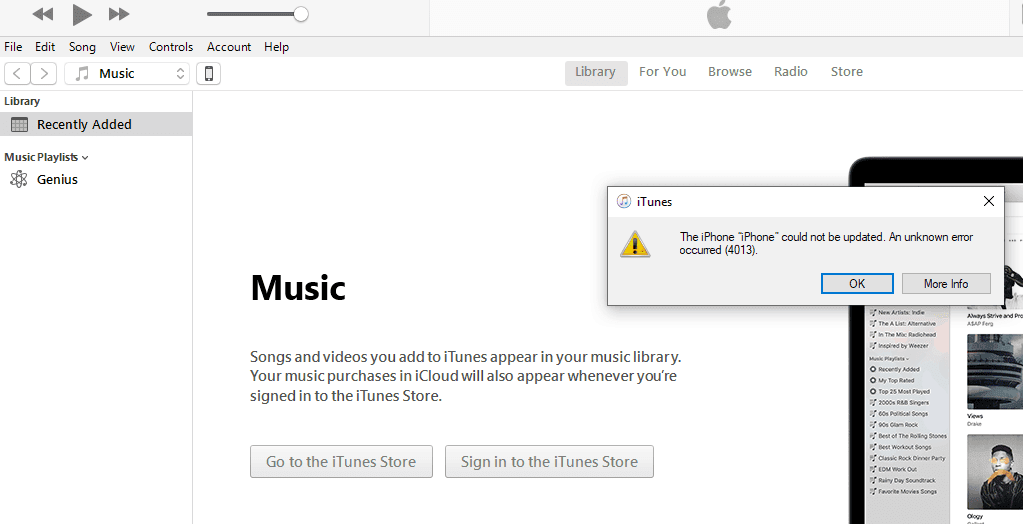
    3. If you get error 4013 then iTunes will ask if you’d like to restore the phone. Do not restore the phone if the update does not work. Restoring the phone would delete all of the data on your iPhone X.

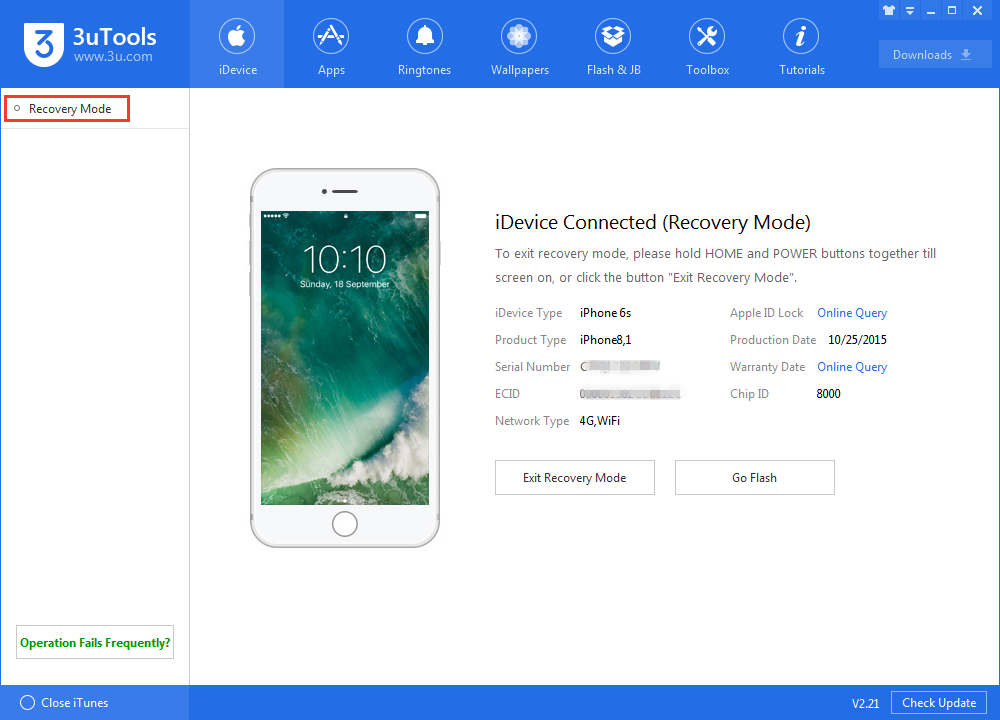
    4. Lastly there are a couple of programs that can be used to take the phone out of recovery mode. One that we recommend is called 3U tools. Once the program recognizes the iPhone then there will be an option to “Exit recovery mode”

    How to Permanently Fix

    If the last couple steps did not solve your problem then you most likely have an internal problem with the phone. We use special microsoldering tools to inspect and test the logic board in order to find the damaged component. If data is important to you then a logic board issue would rarely delete any of your data. If your problem is due to a logic board fault then a microsoldering tech with logic board repair experience can fix this problem successfully and get you your contacts and pictures safely.
    We strongly urge you to look for a local repair shop near you and make sure they do micro soldering as we do not recommend anyone to attempt this repair without prior experience, if you can’t find any near you, we offer nationwide mail-in-repairs with free shipping both ways, to get your order started simply 

    https://cellphoneninja.co.za/
  • iPad Pro 12.9″ Touch Screen Not Responding After Screen Replacement

    iPad Pro 12.9″ Touch Screen Not Responding After Screen Replacement

    Symptoms

    The iPad Pro 12.9″ touch screen will not work regardless of what you do, it doesn’t respond to touch regardless of the fact that you restarted it and did a hard reset. The iPad Pro 12.9″ unresponsive touch screen is usually caused after a screen replacement. If you’re having any unresponsiveness and you have not replaced your screen, a factory reset should fix your problem.

    Reason

    The iPad Pro 12.9″ no touch issue is caused by a fuse that gets blown when you replace the screen. This fuse can easily be blown if the screen cable was taken off improperly or while the battery is still connected. In this case, you’re pretty much forced to take the iPad 12.9″ screen flex cable off before you unplug the battery. Once the fuse is blown, the touch screen on your iPad will no longer respond to anything regardless of what you do.

    Is There a Temporary Fix?

    Unfortunately, there is no temporary fix to this problem. The only real solution is listed below, we accept mail-in-orders for iPads if you’d like us to get it taken care of. 

    How to Permanently Fix

    In order to get the iPad Pro 12.9″ that has no touch / unresponsive touch screen fixed, you need to take the whole iPad apart to get to the logic board and then use special micro-soldering tools to get the blown fuse replaced properly. Special and advanced tools are required to do this repair, these tools include a microscope, heat gun, and everything needed to desolder and resolder the fuse. Only micro-soldering techs with logic board repair experience are capable of getting this repaired successfully, if you put too much heat on the logic board or mistakenly move other components around as you’re soldering then you could easily cause permanent damage to your iPad Pro 12.9″.
    We strongly urge you to look for a local repair shop near you and make sure they do micro soldering as we do not recommend anyone to attempt this repair without prior experience, if you can’t find any near you, we offer nationwide mail-in-repairs with free shipping both ways, to get your order started simply.

  • Endpoint security and cloud architecture

    Endpoint security and cloud architecture

    Hackers love endpoints—those end-user devices that connect to your enterprise network. With a little ingenuity, bad actors (outside or inside your organization) can access sensitive data through employees’ laptops and smartphones, the office security cameras, printers, and a host of other entry points.

    Endpoint security protects your enterprise resources by safeguarding these end-user devices from breach or physical theft. But many organizations are asking how cloud computing fits into the equation. In this brief interview, Pluralsight instructor Terumi Laskowsky (TL) walks through the considerations and responds to frequently asked questions.

    How has endpoint security changed in the era of cloud?

    TL: A decade ago, organizations typically limited the type of end-user devices that could connect to the corporate network, which gave IT professionals significant control over device security.

    In contrast, cloud involves broad network access, and the possible devices that can access the cloud are growing exponentially and more geographically distributed.

    Gone are the days where equipment lived primarily on a corporate campus, accessed through highly secure VPN connections. Today’s devices often access the corporate network via the cloud, without this enhanced scrutiny in place.

    Many enterprises utilize a hybrid deployment model where the cloud is an extension of on-premises infrastructure. This requires security professionals to consider an ever-growing assortment of endpoint devices, which all represent potential attack vectors and require risk management strategies to protect corporate resources and data.

    How do you protect endpoints?

    TL: First, it’s important to recognize that a device can be an attacker or a victim. So, you have to plan for both scenarios. How do you protect a device from a cyber attack? And how do you protect your corporate resources against a compromised device?

    You can install an endpoint security solution in a device and control its behavior using an organizational security policy. For example, to protect data leakage from these devices, the security policy could prohibit using USB sticks. Here’s another example: You could enforce whole-disk encryption in case someone loses their end-user devices. This is easier to do if your organization owns and manages the devices.

    However, many employers allow personally owned devices to connect to the corporate infrastructure, especially from the cloud. This complicates the matter. If you allow your company to install an agent on your phone, who has control over your phone? How about your private data on the phone? Is your privacy protected? Organizations need to think through and resolve these questions.

    What should an endpoint protection strategy include?

    TL: Organizations need to catalog all devices that access corporate resources—from computers and smartphones to IoT devices such as fire alarms, thermostats, the sensors where employees swipe their badges to gain access to your building, and an ever-growing assortment of smart technology.

    Anything that connects to your corporate resources can be a point of entry for a cyberattacker. This means you need a process for constantly updating your inventory of endpoint devices and managing each via an endpoint security corporate policy.

    Your strategy also needs to identify who owns the responsibility for maintaining the security of each endpoint device. In some cases, the answer is IT. In other cases, you’ll need a formal shared responsibility agreement. For example, your facilities team maintains your thermostats. What aspects of security will they be responsible for? And what will IT handle?

    This can’t just be an exercise on paper—a document that sits on a shelf and collects dust. When there’s shared responsibility, both parties need to formally acknowledge they understand their role. And you need an oversight process that periodically audits security for each of the endpoint devices.

    When organizations don’t plan for shared responsibility, security can fall through the cracks.

    Actor Henry Winkler said, “Assumptions are the termites of relationships.” In my opinion, they also are the termites of cybersecurity. A good endpoint security policy clearly articulates who is responsible for the security of each device so there are no assumptions or oversights.

    T. Laskowsky

    How does the cloud deployment model affect endpoint security?

    TL: Here’s a rule of thumb to consider when planning your cloud strategy:
    Complexity increases overall security risk and complicates endpoint security planning.

    If 100% of your corporate resources live in a private cloud (single tenant = you), your endpoint security planning is easier than with a multi-tenant public cloud.

    When you have part of your corporate resources in one spot—say, an on-prem data center—and the rest with a public cloud provider (a hybrid cloud approach), you need security planning for both sets of resources. The complexity of connecting the two increases the risk of security vulnerabilities. Same with multicloud, where you’re utilizing two or more public cloud providers.

    Each of these models requires a different level of effort to manage security risk.

    What are endpoint security best practices when the cloud is involved?

    TL: Applying security controls to the endpoint is just one step. Organizations must also apply security controls to the critical resources, such as network, database, email systems, to detect and neutralize insider threats.

    Second, corporations must beef up their detection of malicious behavior patterns in their infrastructure. This will help them respond to threats faster and isolate the internal threat agent quickly. This response can also update the security policy to enhance the security of all endpoint devices—features normally part of endpoint detection and response (EDR) solutions.

    Third, have strong ingress (protection from incoming attacks from endpoints on the Internet) and egress (protection from exfiltration of data from the corporate network) filters. The best move: pair egress filtering, also known as DLP (data loss prevention) solutions, with endpoint security.

    Fourth, apply attribute-based access control so that if an end user is connecting using an approved device with endpoint protection implemented from an approved location (i.e., attributes), they’re given greater access compared to those accessing the Internet using non-standard devices.

    And finally, continue to use traditional protection of the endpoint itself if possible. We’re talking solutions such as strong encryption, anti-malware detection, host-based firewall, host-based intrusion detection and prevention, and remote-wiping capability.

    How do cloud providers help with endpoint security?

    TL: Your stakeholders entrust you to protect their data. So, you need to own your security plan. While major cloud providers offer various endpoint security solutions, it’s vital to think of cloud security as a shared responsibility managed by you. Your organization’s reputation is on the line. You have bottom-line responsibility for security.

    Via: https://www.pluralsight.com/

  • Why oracle database runs best on oracle linux

    Why oracle database runs best on oracle linux

    If you are considering deploying, or looking at ways to optimize performance, scalability, and total cost of ownership of running Oracle Database, Why Oracle Database runs best on Oracle Linux is well worth a read. This technical brief explains what makes Oracle Linux the best choice for a cloud-ready, cost-effective, and high-performance operating environment when modernizing infrastructure or consolidating Oracle Database instances.

    When you deploy Oracle Database on Oracle Linux, you can have the confidence that you are deploying on an operating system backed by development teams that work closely together to optimize performance, security, mission-critical reliability, availability, and serviceability. Because Oracle’s applications, middleware, and database products are developed on Oracle Linux, you’ll be deploying on an extensively tested solution, whether it be on-premises or in Oracle Cloud.

    For Oracle Database workloads, advantages are afforded by the operating system’s deep integration with the solution stack, optimizations resulting from Oracle’s upstream Linux kernel work and industry collaborations, and enhancements delivered in the Unbreakable Enterprise Kernel (UEK) for Oracle Linux. In this paper, you will discover how Oracle Linux provides performance, scalability, and resource management optimizations for Oracle Database deployments. You’ll learn about the innovative solution, Oracle Database Smart Flash Cache that runs on OL and helps accelerate I/O operations for database workloads. 

    With Oracle Linux Support, your software environment is backed by the expertise of Oracle’s global 24×7 support organization, regardless of whether you deploy on Oracle servers, Oracle Engineered Systems, Oracle Cloud Infrastructure (OCI), certified partner hardware, or other public clouds. You also receive management and high availability solutions at no additional charge, which helps reduce the TCO of your database infrastructure. Additionally, when you deploy Oracle Database on OCI, all the benefits of Oracle Linux Support and more are provided at no additional cost.

    To find out more about these and other Oracle Linux advantages for Oracle Database, download a copy of the technical brief: Why Oracle Database Runs Best on Oracle Linux today.

    Via: https://blogs.oracle.com/

  • Six ways to improve data lake security

    Six ways to improve data lake security

    Data lakes, such as Oracle Big Data Service, represent an efficient and secure way to store all of your incoming data. Worldwide big data is projected to rise from 2.7 zettabytes to 175 zettabytes by 2025, and this means an exponentially growing number of ones and zeroes, all pouring in from an increasing number of data sources. Unlike data warehouses, which require structured and processed data, data lakes act as a single repository for raw data across numerous sources.

    What do you get when you establish a single source of truth for all your data? Having all that data in one place creates a cascading effect of benefits, starting with simplifying IT infrastructure and processes and rippling outward to workflows with end users and analysts. Streamlined and efficient, a single data lake basket makes everything from analysis to reporting faster and easier.

    There’s just one issue: all of your proverbial digital eggs are in one “data lake” basket.

    For all of the benefits of consolidation, a data lake also comes with the inherent risk of a single point of failure. Of course, in today’s IT world, it’s rare for IT departments to set anything up with a true single point of failure—backups, redundancies, and other standard failsafe techniques tend to protect enterprise data from true catastrophic failure. This is doubly so when enterprise data lives in the cloud, such as with Oracle Cloud Infrastructure, as data entrusted in the cloud rather than locally has the added benefit of trusted vendors building their entire business around keeping your data safe.

    Does that mean that your data lake comes protected from all threats out of the box? Not necessarily; as with any technology, a true assessment of security risks requires a 360-degree view of the situation. Before you jump into a data lake, consider the following six ways to secure your configuration and safeguard your data.

    Establish Governance: A data lake is built for all data. As a repository for raw and unstructured data, it can ingest just about anything from any source. But that doesn’t necessarily mean that it should. The sources you select for your data lake should be vetted for how that data will be managed, processed, and consumed. The perils of a data swamp are very real, and avoiding them depends on the quality of several things: the sources, the data from the sources, and the rules for treating that data when it is ingested. By establishing governance, it’s possible to identify things such as ownership, security rules for sensitive data, data history, source history, and more.

    Access: One of the biggest security risks involved with data lakes is related to data quality. Rather than a macro-scale problem such as an entire dataset coming from a single source, a risk can stem from individual files within the dataset, either during ingestion or after due to hacker infiltration. For example, malware can hide within a seemingly benign raw file, waiting to execute. Another possible vulnerability stems from user access—if sensitive data is not properly protected, it’s possible for unscrupulous users to access those records, possibly even modify them. These examples demonstrate the importance of establishing various levels of user access across the entire data lake. By creating strategic and strict rules for role-based access, it’s possible to minimize the risks to data, particularly sensitive data or raw data that has yet to be vetted and processed. In general, the widest access should be for data that has been confirmed to be clean, accurate, and ready for use, thus limiting the possibility of accessing a potentially damaging file or gaining inappropriate access to sensitive data.

    Use Machine Learning:Some data lake platforms come with built-in machine learning (ML) capabilities. The use of ML can significantly minimize security risks by accelerating raw data processing and categorization, particularly if used in conjunction with a data cataloging tool. By implementing this level of automation, large amounts of data can be processed for general use while also identifying red flags in raw data for further security investigation.

    Partitions and Hierarchy: When data gets ingested into a data lake, it’s important to store it in a proper partition. The general consensus is that data lakes require several standard zones to house data based on how trusted it is and how ready-to-use it is. These zones are:

    • Temporal: Where ephemeral data such as copies and streaming spools live prior to deletion.
    • Raw: Where raw data lives prior to processing. Data in this zone may also be further encrypted if it contains sensitive material.
    • Trusted: Where data that has been validated as trustworthy lives for easy access by data scientists, analysts, and other end users.
    • Refined: Where enriched and manipulated data lives, often as final outputs from tools.

    Using zones like these creates a hierarchy that, when coupled with role-based access, can help minimize the possibility of the wrong people accessing potentially sensitive or malicious data. 

    Data Lifecycle Management:Which data is constantly used by your organization? Which data hasn’t been touched in years? Data lifecycle management is the process of identifying and phasing out stale data. In a data lake environment, older stale data can be moved to a specific tier designed for efficient storage, ensuring that it is still available should it ever be needed but not taking up needed resources. A data lake powered by ML can even use automation to identify and process stale data to maximize overall efficiency. While this may not touch directly on security concerns, an efficient and well managed data lake allows it to function like a well-oiled machine rather than collapsing under the weight of its own data.

    Data Encryption:The idea of encryption being vital to data security is nothing new, and most data lake platforms come with their own methodology for data encryption. How your organization executes, of course, is critical. Regardless of which platform you use or what you decide between on premises vs, cloud, a sound data encryption strategy that works with your existing infrastructure is absolutely vital to protecting all of your data whether in motion or at rest—in particular, your sensitive data.

    Create Your Secure Data Lake

    What’s the best way to create a secure data lake? With Oracle’s family of products, a powerful data lake is just steps away. Built upon the foundation of Oracle Cloud Infrastructure, Oracle Big Data Service delivers cutting-edge data lake capabilities while integrating into premiere analytics tools and one-touch Hadoop security functions. Learn more about Oracle Big Data Service to see how easy it is to deploy a powerful cloud-based data lake in your organization—and don’t forget to subscribe to the Oracle Big Data blog to get the latest posts sent to your inbox.

    Via: https://blogs.oracle.com/

  • Four ways financial services companies use big data

    Four ways financial services companies use big data

    Big data is rapidly becoming the key driver in the financial services industry. Big data covers a lot of areas: transactions, customer accounts, vendors, and more. All include individual fields of data, from time stamps to payment amounts to unstructured text fields of additional data (such as call center notes). Consider these numbers: the volume of digital banking users has increased from 20% in 2010 to 61% in 2018—more than tripling in a number of years. At the same time, the number of connected devices in the past decade has grown exponentially, with more than 90% of data driven around the digital world being generated in the past two years alone.

    The majority of people are accessing their money digitally, and the use of smart devices—be it phone, tablet, laptop, or even web-connected appliances with purchase capabilities—is growing exponentially.  And the volume of transactions happening per second feels countless, and perhaps what’s even more daunting is the amount of security required to handle such a thing.

    If you consider that every device in the world, be it a phone or a smart TV, is a potential access point for hackers, the need for reliable security suddenly gets put into perspective.

    Fortunately, the financial services industry is already on top of this. Many of the world’s biggest providers are leading the charge by combining big data with machine learning (ML). Not only does ML make your money safer, it delivers a better customer experience. Let’s take a look at four specific ways the financial services sector is integrating big data into everyday operations.

    Fraud Detection

    The digital age has transformed the way fraud works—not just from people unscrupulously trying to steal, but also the security teams attempting to protect customer money. Today’s economy is run via online transactions and transfers, which means that for fraudsters, gaining access (usually by stealing someone’s identity or credentials) is the goal. They attempt this in a number of ways, from skimmers on PIN pads to malware transmitted online to brute-force hacks of accounts. On a macro scale, that data can tell a lot about the different parties involved; patterns can create expected profiles and, more importantly, identify when potentially fraudulent activity occurs outside of those expectations. While the finance industry can’t protect everyone at every transaction, they can at as both a safety net and firewall against these types of bad actors thanks to big data.

    Challenges

    To properly process this volume of data, various transaction datasets—with additional information such as interaction events and customer behavior—must be consolidated. That means storing data in an appropriate repository, such as a data lake, and applying ML to efficiently crunch the data while identifying patterns.

    Financial Regulatory and Compliance Analytics

    Regulatory compliance has been an issue for financial institutions since their inception. But in the digital world, regulations have rapidly changed. In addition to working within a digital landscape, regulations have quickly evolved to get a handle on new issues such as an increasing amount of cross-border transactions and the rise of cryptocurrencies.

    Because of evolving regulatory rules, big data benefits financial services by offering large-scale processing of data sets as well as the ability to enact wholesale rule tweaks that quickly enable process updates for compliance. The collection of big data is the foundation for compliance, as it provides real-time proof of adherence to regulations (or identification of issues). This will never change the need for a compliance department to oversee and steer such things, but it will streamline and consolidate involved workflows, as well as minimize human error on records. A prime example of this comes from Caixa Bank, which saved 60,000 work hours overseeing Spain’s direct debits process.

    Challenges

    Similar to fraud detection, regulatory compliance requires bringing together multiple sources. On top of that, compliance also utilizes advanced risk models, and these must be generated quickly without creating any impact on other projects.

    Improve Customer Service Through Big Data

    Any organization’s operations can achieve valuable improvements with big data, and the financial services industry is no different. Consider the steps along any workflow; externally, banks and organizations are looking at customer retention and activity on loans, special offers, balance transfers, and other types of financial offerings. Internally, these same organizations are looking for any sort of process improvement, whether it’s in HR, IT, marketing, sales, or any other organization.

    Big data provides insights that lead to innovation. Let’s take the example of maximizing customer engagement. Big data can look at a customer transactional data and account history to identify purchase patterns, geographic locations, and other potential engagement triggers. With ML, models can be built to identify the customer needs based on this data and extend appropriate offers that maximize potential for engagement. For example, if the ML model determines that a customer is doing a bit of remodeling work by shopping at hardware stores and related businesses, it could trigger an offer for a home equity line of credit.

    Challenges 

    To get the most accurate view of a customer, as many sources need to be used, including licensed third-party data regarding outside factors such as demographic and geographic data. Data scientists will also need to build and constantly refine customer models while also looking at big-picture economic factors such as interest rates.

    Anti-Money Laundering Strategies

    As a subset to both fraud detection and compliance, financial services firms are facing increasing pressure from governments specifically regarding anti-money laundering laws (AML). Money laundering is a different issue from purely fraudulent transactions, and laws and regulations targeting this sort of thing have a much wider scope, including tax evasion, public fund corruption, and market manipulation. Other elements involve concealing these crimes and any money derived from these actions.

    For AML compliance, data must be ingested from extremely diverse sources (sanctions lists, legal data, transactions, application logs). Also, ML models need to look at known money-laundering methods across timing and context in order to flag items for further investigation. Merely working within established rules (such as a transaction threshold) creates black-and-white thinking to an issue with a lot of gray-area manipulation by criminals. This is where ML can truly add value thanks to models that evolve over time as criminal schemes become more nuanced and sophisticated.

    Challenges 

    A wide range of sources is required for AML compliance, including taking on datasets that have many combinations of structured, unstructured, and multi-structured data. Models have to be built to meet the latest regulations, along with constant updating to maintain compliance. Other elements include using tools such as graph analytics to reveal hidden relationships.

    Other Big Data Use Cases

    This post featured an up-close look at big data in the financial services industry, but big data and ML can provide the same types of benefits for just about any industry. To learn more, take a look at Oracle’s Top 22 Use Cases for Big Data. Covering manufacturing, retail, healthcare, and more, this ebook provides insights into the power of big data across multiple industries.

    And for more about how you can benefit from Oracle Big Data, visit Oracle’s Big Data page—and don’t forget to subscribe to the Oracle Big Data blog to get the latest posts sent to your inbox.

    Via: https://blogs.oracle.com/